
Minecraft:Java Edition 14w26a
More actions
Template:Dangerous version Template:Infobox version
14w26a is the twenty-ninth Minecraft:snapshot released for 1.8, released on June 25, 2014,<ref name="mojang">Template:Cite</ref> which adds the Minecraft:debug mode world type and the Template:Cmd command.
It was strongly advised to make a backup of a world before using this snapshot, because of block-corrupting problems that were not corrected until Minecraft:14w26c.<ref name="mojang"/> A potential means of recovering corrupted worlds using MCEdit is available.<ref>http://www.reddit.com/r/Minecraft/comments/29551r/if_you_corrupted_a_large_project_or_lost_a_large/</ref>
This snapshot is the first after a decision to release snapshots on Wednesdays rather than on Thursdays.<ref name="mojang"/>
Additions
World generation
Minecraft:Debug mode world type
- Useful for Minecraft:resource pack makers.
- Hold Template:Key and cycle through "World Type" to select it.
- Spectator mode recommended to avoid crashes (Creative mode can also be used without any effect on some machines).
- All possible blocks with all possible data values are generated.
- They are arranged in a grid across height Y=70, with a Minecraft:barrier floor at Y=60.
- Blocks placed are deleted, and blocks destroyed are restored.
- There is a special generator option preventing this. It is called "debug_all_block_states". If the player changes this to "flat" or "default" in NBTexplorer, they are able to interact with the world. (Only for a short period though, on most machines there is a lot of lag or the game crashes - not recommended to play Survival on)
Command format
- Added
><Minecraft:scoreboard operator.
- Can replace items in any inventory, including the inventories of mobs such as zombies.
- Full syntax:
/replaceitem entity <entity> <slot> <item> [amount] [data value]./replaceitem block <x> <y> <z> <slot> <item> [amount] [data value].
- Example:
/replaceitem entity @e[type=Zombie] slot.weapon minecraft:iron_sword 1 0gives all the zombies iron swords. - Example:
/replaceitem entity @p slot.hotbar.0 minecraft:fish 4 2puts 4 clownfish in the players first hotbar slot. - Example:
/replaceitem block ~ ~-1 ~ slot.container.5 minecraft:redstone_block 1 0puts a redstone block in the 6th slot of a container 1 block beneath the player.
- Full syntax:
sendCommandFeedback- If set to false, player-run commands don't show a success message.
Changes
Blocks
General
- Switched to only/mostly using blockstates in the code, though not all block combinations are blockstates yet.
- X/O button next to "Last output" in command block to turn off the last output string.
- Empty furnaces now only accept fuel and empty buckets in the fuel slot.
- The wood part of the frame now uses the oak texture rather than the birch texture.
- Changed model from File:Attached Melon Stem (N) JE3.pngFile:Attached Melon Stem (E) JE3.pngFile:Attached Melon Stem (S) JE3.pngFile:Attached Melon Stem (W) JE3.png to File:Attached Melon Stem (N) JE4.pngFile:Attached Melon Stem (E) JE4.pngFile:Attached Melon Stem (S) JE4.pngFile:Attached Melon Stem (W) JE4.png
_JE3.png)
_JE3.png)
_JE3.png)
_JE3.png)
_JE4.png)
_JE4.png)
_JE4.png)
_JE4.png)
- Changed model from File:Attached Pumpkin Stem (N) JE3.pngFile:Attached Pumpkin Stem (E) JE3.pngFile:Attached Pumpkin Stem (S) JE3.pngFile:Attached Pumpkin Stem (W) JE3.png to File:Attached Pumpkin Stem (N) JE4.pngFile:Attached Pumpkin Stem (E) JE4.pngFile:Attached Pumpkin Stem (S) JE4.pngFile:Attached Pumpkin Stem (W) JE4.png
_JE3.png)
_JE3.png)
_JE3.png)
_JE3.png)
_JE4.png)
_JE4.png)
_JE4.png)
_JE4.png)
World generation
Customized world type
- Has an Minecraft:ocean monument toggle.
- Re-added marsh-like areas which were removed in Minecraft:13w38b after initially being introduced in Minecraft:13w36a.<ref>https://web.archive.org/web/20221015041624/https://i.imgur.com/lQELvLX.jpg</ref>
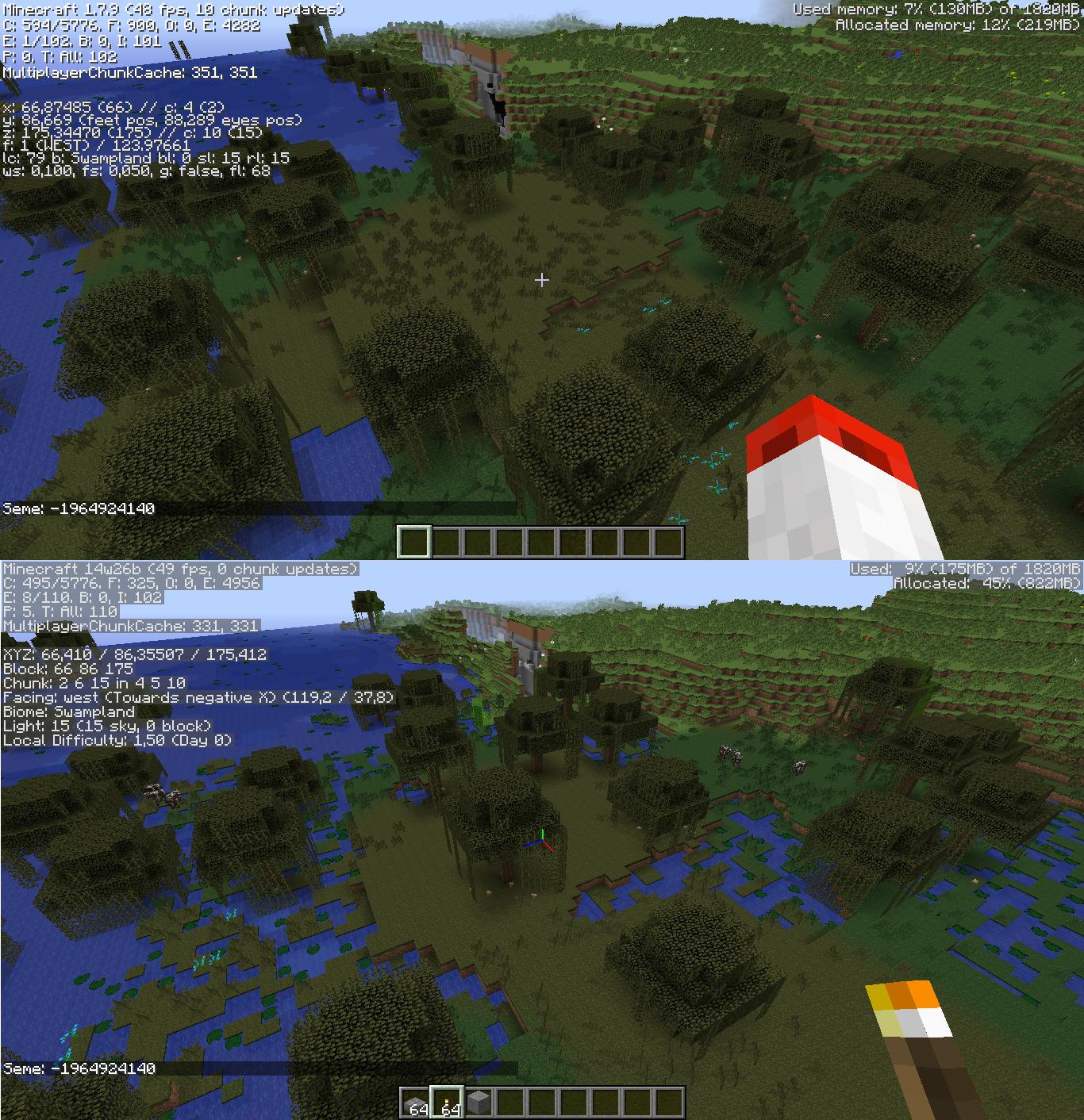
- No longer have a Minecraft:red mushroom inside the Minecraft:flower pot.<ref>Template:Bug</ref>
Command format
- Now has a
detectargument (sub-command, only works when used with execute).- Allows the
executecommand to run only if a block is detected at a specific location relative to the target. - Example:
/execute @a ~ ~ ~ detect ~ ~-1 ~ minecraft:grass 0 say You are standing on grass..
- Allows the
- Block limit changed from 4096 to 32768 blocks.
- Now has an
addargument.- Similar to the
setargument, but can be used to add (or remove) a certain number of blocks to the world border distance. - Negative numbers can be used to remove blocks.
- Example:
/worldborder add -75shrinks the world border width by 75 blocks.
- Similar to the
- Now has an
General
- Instead of specifying uvs, the Minecraft:player can now choose textures to be projected onto the Minecraft:model.
- Reworked 3D resources, adding the possibility of new blocks with multiple textures.
- Items in Minecraft:first-person view no longer move up and down when switching between 2 identical items by changing the selected Minecraft:hotbar slot.
Fixes
Trivia
- 14w26a was previously removed from the Minecraft:launcher for some time, but was added back in September 2018.
References
Template:Navbox Java Edition versions
Minecraft:de:14w26a Minecraft:es:Java Edition 14w26a Minecraft:fr:Édition Java 14w26a Minecraft:it:Java Edition 14w26a Minecraft:ja:Java Edition 14w26a Minecraft:pt:Edição Java 14w26a Minecraft:ru:14w26a (Java Edition) Minecraft:zh:Java版14w26a