
Minecraft:Java Edition 1.8
More actions
Template:Dangerous version Template:Infobox version Template:Relevant guide
1.8, the release of the Minecraft:Bountiful Update,<ref name="blogpost">Template:Cite</ref> is a major update to Template:JE released on September 2, 2014. It adds Minecraft:ocean monuments, Minecraft:rabbits, many decorative and functional blocks, and several map-making utilities, among which include Minecraft:barriers, a customizable Minecraft:world border, in addition to many new Minecraft:commands being added as well.
The update has two main themes, one being features added for mapmakers and the other being new survival features. The official name for the update, the Bountiful Update,<ref>Template:Tweet</ref> was announced on August 22, 2014 in a blog post on the Mojang website.
This is the only major update for Template:JE that was released in 2014.
Additions
Blocks
width=32x32 Minecraft:Andesite

- Crafting recipe: 1 cobblestone and 1 diorite.

- Crafting recipe: 2 Minecraft:cobblestone and 2 Minecraft:nether quartz in a checker board pattern.

- Crafting recipe: 1 Nether quartz and 1 diorite.
Template:Animate Polished variants of Diorite, Andesite & Granite
- Crafting recipe: 4 pieces of one of the materials, in a 2×2 configuration.
width=32x32 Minecraft:Slime Block

- Crafting recipe: 9 Minecraft:slime balls.
- Can be crafted back into 9 slime balls.
- Players and mobs that land on their top side bounce, like on a trampoline.
- This negates all fall damage.
- Holding Template:Key negates the rebound, and does not negate the fall damage.
- Bounce rebound velocity is scaled by impact velocity.
- Height can reach up to 60% of initial height, which implies a great restitution coefficient.
- Does not affect falling item entities.
- This negates all fall damage.
- Walking on it is slower than walking on Minecraft:soul sand and close to one's speed while sneaking.
- The placing/breaking sounds use the hurt sounds of Minecraft:slimes.
- Can be mined with only one punch, without any tools in Survival.
- Slime blocks push and pull each other, along with adjacent blocks, when at least one of them is moved by a sticky piston.
- Normal pistons have the same effect, except that they fail to pull even a single slime block.
- Coded by KaboPC and Panda4994.<ref>Template:Ytl</ref><ref>Template:Tweet</ref> Follow all the existing rules that pistons followed:
- A chain of slime blocks and its adjacent blocks connected to a piston, in any arrangement, can be moved as long as the following conditions are met:
- The piston is not moving more than twelve blocks at a time.
- Non-movable blocks are not obstructing the path.
- Not a single slime block in the chain is attached to the piston itself.
- A chain of slime blocks and its adjacent blocks connected to a piston, in any arrangement, can be moved as long as the following conditions are met:
- Allows for movable contraptions.
- Extending a piston with a slime block attached propels adjacent entities (mobs, players, items, launched arrows, etc.) in the appropriate direction.<ref>Template:Tweet</ref>
width=32x32 Minecraft:Barriers
_JE1_BE1.png)
- Acts like Minecraft:bedrock, but is completely transparent.
- Can transfer redstone signals and allows blocks and entities to be placed on it.
- Can be destroyed and obtained only in Creative mode.
- It gives the same particles as lava does when destroyed.
- Becomes visible to players who are holding a barrier in their hand, while in Creative.
- Appears to be rendered as specially big particles, in the form of a red and square cross-out symbol.
- There is exactly one particle inside of every block.
- The face always follows the player.
- That texture is also used for its item form.
- The particles are rendered only for the blocks in the vicinity of the player.
- Appears to be rendered as specially big particles, in the form of a red and square cross-out symbol.
- Can be broken by withers.<ref name="Release change" group=note>This change occurred between the last development version for 1.8, Minecraft:1.8-pre3, and the full release of 1.8.</ref>
width=32x32 Minecraft:Iron Trapdoor
_JE1_BE1.png)
- Can be opened and closed only by using redstone, similar to an iron door.
- Crafting recipe: Minecraft:iron ingots in a 2×2 pattern.
width=32x32 Minecraft:Prismarine

- Generates in Minecraft:ocean monuments.
- Can be crafted with Minecraft:prismarine shards.
- The cracks in prismarine slowly change color between brown, blue, gray and purple.
width=32x32 Minecraft:Prismarine Bricks

- Generate in Minecraft:ocean monuments.
- Can be crafted with Minecraft:prismarine shards.
width=32x32 Minecraft:Dark Prismarine

- Generate in Minecraft:ocean monuments.
- Can be crafted with Minecraft:prismarine shards and an Minecraft:ink sac.
width=32x32 Minecraft:Sea Lantern

- Generate in Minecraft:ocean monuments.
- Can be crafted with Minecraft:prismarine shards and Minecraft:prismarine crystals.
- Emit light at a light level of 15 and have a subtle animated texture.
width=32x32 Minecraft:Coarse Dirt

- Replaces the grassless dirt variant found in mega taiga, mesa and savanna Minecraft:biomes.
- All worlds with grassless dirt blocks seamlessly change over to coarse dirt, as it uses the same block ID and data value as the original grassless dirt block.
- Slightly darker texture than regular Minecraft:dirt.
- Silk Touch is not required for obtaining it in Survival.
- Tilling coarse dirt with a Minecraft:hoe turns it to regular dirt.
- Crafting recipe: dirt and Minecraft:gravel in a 2×2 checkered pattern yields four coarse dirt.

- Obtained when a Minecraft:sponge soaks up water.
- Smelting a wet sponge yields a dry sponge.
- When smelted, they fill empty buckets in the fuel slot with water if possible.
- Emits water dripping particles while placed.
- Dropped by Minecraft:elder guardians on player kills.
Template:Animate Minecraft:Banners
- Crafted like signs, but with one color of wool instead of planks.
- The color of wool represents the base color.
- Can be stacked to 16.
- Most patterns are created by arranging dyes in certain ways around a banner on a crafting table (see the page on banners for a full list).
- Other patterns are achieved with specific items.
- Item – pattern: "creeper head – creeper face", "wither skeleton skull – skull and crossbones", "brick block – brick texture background", "oxeye daisy – flower icon", "vines – curly border" and "enchanted golden apple – Mojang logo.
- Making these patterns without dyes results in a black color by default
- Other patterns are achieved with specific items.
- Banners can have up to six layers (in Survival).
- Over a quadrillion possible combinations, counting rotations and visually identical patterns due to occlusion.
- The layers show in the order they were created.
- Custom banners with more than six layers are possible using commands.
- Top-most layer can be removed using cauldrons.
- This removes a third of the water of a full cauldron.
- All layers can be removed.
- Can be placed on walls or on the ground.
- They are visually like an entity that is one block wide and two blocks tall, but in reality they are a block occupying the lower portion, but having a bigger model.
- The hitbox is smaller than a full block, and it lacks any collision properties.
- This allows for a solid block to occupy the upper portion of the banner.
- They are vulnerable to be destroyed by either water or lava flows.
- On the ground they have 16 different possible rotations (like an Minecraft:armor stand).
- Has an animation when placed on the ground, that simulates swaying with the wind.
- The hitbox is smaller than a full block, and it lacks any collision properties.
- Can be worn as head gear, but only using the Template:Cmd command.
- Can be cloned by crafting them together, with a blank banner of the corresponding base color.
- Can be used as fuel in Minecraft:furnaces.
Template:Animate Minecraft:Red Sandstone
- Can be crafted with 4 Minecraft:red sand in a square.
- Can be crafted into chiseled, smooth, stair and slab forms.
- Chiseled variant has a Minecraft:wither pattern to complement the Minecraft:creeper pattern found in Minecraft:chiseled sandstone.
- Slabs have a smooth variant, similar to Minecraft:stone and Minecraft:sandstone.
- Comes as a smooth double slab –
minecraft:double_stone_slab2:8.
- Generated only in Mesa Minecraft:biomes at cave entrances.
Template:Animate Template:Animate Template:Animate Minecraft:Fences, Minecraft:fence gates and Minecraft:doors
- New variants of fences, fence gates and doors, for all the different types of Minecraft:planks.
- Different types of fences and fence gates can connect to each other (except for Nether brick fences, as usual).
- Every recipe requires all wood planks to be of the same type.
- New crafting recipe for fences: 2 sticks in a row in the middle and 4 planks at their sides to make 3 fences.
- Different types of doors have different models, with some types having no windows.
Template:Crafting Table Template:Crafting Table Template:Crafting Table
Items
width=32x32 Minecraft:Prismarine crystals

- Drop from Minecraft:guardians.
- Used to craft Minecraft:sea lanterns.
width=32x32 Minecraft:Prismarine shard

- Drop from Minecraft:guardians.
- Used to craft all three kinds of prismarine blocks and sea lanterns.
width=32x32 Minecraft:Raw mutton

- Drops from Minecraft:sheep.
- Restores Template:Hunger and 1.2 saturation.
- Can be cooked into Minecraft:cooked mutton.
width=32x32 Minecraft:Cooked mutton

- Restores Template:Hunger and 9.6 saturation.
width=32x32 Minecraft:Raw rabbit

- Drops from Minecraft:rabbits.
- Restores Template:Hunger and 1.8 saturation.
- Can be cooked into Minecraft:cooked rabbit.
width=32x32 Minecraft:Cooked rabbit

- Restores Template:Hunger and 6 saturation.
width=32x32 Minecraft:Potion of Leaping

- Inflicts a Jump Boost effect with "I" and "II" levels.
- Brewed with a Minecraft:rabbit's foot and an Minecraft:Awkward potion.
- The potion and particle effects are bright green colored.
- Can be made into a Splash Potion of Leaping by putting one gunpowder in the brewing slot.
width=32x32 Minecraft:Rabbit's foot

- Drops from Minecraft:rabbits.
- Brewed to make a Potion of Leaping.
width=32x32 Minecraft:Rabbit hide

- Drops from Minecraft:rabbits.
- Can be crafted in a 2×2 arrangement to produce Minecraft:leather.
width=32x32 Minecraft:Rabbit stew

- Restores Template:Hunger and 12 saturation.
- Recipe: 1 Minecraft:cooked rabbit, 1 Minecraft:mushroom, 1 Minecraft:carrot, 1 Minecraft:baked potato and 1 Minecraft:bowl.
- width=32x32 Minecraft:Endermite spawn egg
- Spawns endermites.

- width=32x32 Minecraft:Guardian spawn egg
- Spawns guardians.

- width=32x32 Minecraft:Rabbit spawn egg
- Spawns rabbits.

Mobs
width=65x65 Minecraft:Endermite

- Sometimes spawns when a player teleports using an Minecraft:ender pearl.
- Despawns after 2 minutes (unless it is named using a Minecraft:name tag).
- Has the same sounds and behavior as the Minecraft:silverfish. However, they cannot enter stony blocks.(Stone, Cobblestone, etc.)
- Minecraft:Endermen are only aggressive to pearl-spawned Minecraft:endermites, rather than those spawned using a Minecraft:spawn egg.
width=65x65 Minecraft:Guardian

- Spawns in Minecraft:ocean monuments.
- Attacks Minecraft:squid and players with a beam.
- The beam itself only warns of an imminent attack.
- Has 2.0 seconds of cooldown time after making an attack.
- When on land it flops around but remains hostile.
- Unlike Minecraft:squid they don't suffocate.
- Drops Minecraft:prismarine shards, Minecraft:prismarine crystals and Minecraft:raw fish.
- Makes wet noises when hurt and squeaky wet noises when flopping around on land.
- The player also gets damaged with a thorns-like effect if it damages the guardian while their spikes are deployed (as if it's being prickled).
width=65x65 Minecraft:Elder guardian

- A boss-like variant of guardians, with greater health, greater size and different appearance.
- There are 3 elders in each Minecraft:ocean monument.
- A flashing elder guardian animation appears on screen when close to the elder guardian, and Minecraft:Mining Fatigue III is inflicted on the player for 5 minutes.
- Drops Minecraft:wet sponge.
Template:Animate Minecraft:Rabbits
- Drops Minecraft:rabbit hide, Minecraft:raw rabbit, Minecraft:cooked rabbit and Minecraft:rabbit's foot.
- They have 8 different skins, similar to horses and ocelots: black, white, brown, gold, black & white, salt & pepper, Toast and the Killer Bunny.
- Naming a rabbit spawn egg or Minecraft:name tag "Toast" gives rabbits a special skin as a memorial to user xyZenTV's girlfriend's rabbit "Toast".
- "The Killer Bunny" is a special type of rabbit, that is hostile toward players within 4 blocks
- It is a rare spawn.
- A reference to the movie Template:W.
- It is white with bloodshot eyes, and blood on its legs and mouth.
- Automatically spawns with a name tag titled "The Killer Rabbit".
- It can be directly spawned in with the command
/summon Rabbit ~ ~ ~ {RabbitType:99}.
- Rabbits can be bred using Minecraft:carrots, Minecraft:golden carrots or Minecraft:dandelions.
- Rabbits have the same AI as the most other passive mobs, and jump around randomly.
- Makes little squeaky sounds when hurt or killed.
- Spawn as any other farm animals, in grassy biomes.
Non-mob entities
width=77x77 Minecraft:Armor stands

- Crafted using a Minecraft:stone slab and 6 Minecraft:sticks.
- Stacks up to 16.
- Can ride on minecarts.
- Can be used to decoratively display armor (including pumpkins, mob heads and player heads).
- Armor can be equipped on the armor stand by holding and interacting with it.
- Armor can be equipped by dispensers aimed at any part of the stand.
- In Survival it is allowed to hold only one piece of each different kind of armor at a time.
- It isn't restricted by the material or any tags of the armor.
- Armor can be removed by using the interact key while pointing on the piece of armor the player wants to remove.
- Can render enchanted and dyed armor as if it were a mob/player.
- While in Creative:
- Using pick-block on any tangible armor stand gives the player a default stand.
- NBT tags can be used to summon armor stands which are small (
Small), invisible (Invisible), have arms (ShowArms), have disabled slots (DisabledSlots), have no base plate (NoBasePlate), have no gravity (NoGravity) and are in pre-configured positions (Pose) – This can be done only through commands.- Armor stands with arms can be equipped with items to hold, so they display the same way as players/mobs.
World generation
Template:EnvSprite Underground
- Minecraft:Granite, Minecraft:andesite and Minecraft:diorite generate in pockets within stone terrain.
- Slightly larger in size and abundance than Minecraft:gravel.
- Pockets don't reduce ore frequency, since ores can generate inside these pockets.
- New underwater generated structure made out of Minecraft:prismarine, Minecraft:prismarine bricks, Minecraft:dark prismarine and Minecraft:sea lanterns.
- 8 Minecraft:gold blocks can be found at the center of the monument, surrounded by dark prismarine.
- Clusters of Minecraft:wet sponge blocks can be found on some rooms.
- A flashing boss Minecraft:guardian appears on screen when close to an Minecraft:elder guardian, and Mining Fatigue III is inflicted on the player for 5 minutes.
- Also generates in old worlds.
Customized world type
- Highly customizable terrain generation.
- To use, press create new world then ‘world type: customized' and then press the 'customize' button.
- There are 4 pages to customize the world.
- Page 1: customizes generation of structures, chance of lake generation, size of certain structures, biome type and size, and sea level.
- There are 18 customization options which affect whether Minecraft:generated structures spawn, as well as other environmental factors such as sea level. Some of these presets are Yes/No inputs or sliders.
- Sea level height, toggles for cave, village, temple, ocean monument, dungeon, water lake, lava lake, stronghold, mineshaft and ravine generation, sliders to control water lake, lava lake and dungeon rarity, toggle to turn oceans into lava oceans, biome selection, biome and river size sliders.
- There are 18 customization options which affect whether Minecraft:generated structures spawn, as well as other environmental factors such as sea level. Some of these presets are Yes/No inputs or sliders.
- Page 2: customizes the ore distribution for Minecraft:dirt, Minecraft:gravel, Minecraft:granite, Minecraft:diorite, Minecraft:andesite, coal, iron, gold, redstone, diamond and lapis.
- Rarity, height range and blob size.
- Page 3 & 4: expert customization of the terrain generation.
- There are 16 customization options which can be used to affect various aspects of Minecraft's terrain generator. These can be changed by moving sliders or by typing in values directly.
- Main noise scale X/Y/Z to smooth out terrain, larger values for smoother terrain; biome scale/depth weight and biome scale/depth offset to stretch/squash terrain vertically based on the biomes default height settings; upper/lower limit scale to make terrain more solid/riddled with holes, depending on how close the values are to each other; height stretch to pull terrain upward, with smaller values causing more extreme stretching; height scale, coordinate scale, depth base size, depth noise exponent and depth noise scale.
- There are 16 customization options which can be used to affect various aspects of Minecraft's terrain generator. These can be changed by moving sliders or by typing in values directly.
- There are seven presets: "Water World", "Isle Land", "Caver's Delight", "Mountain Madness", "Drought", "Caves of Chaos", and "Good Luck".
- Each page has a button to randomize the various values and a button to reset to default values.
- Uses the 'generator-settings' string known from superflat presets for server.properties and world data.
- Generate structures button disappears when selected.
Minecraft:Debug mode world type
- Useful for Minecraft:resource pack makers.
- Hold Template:Key and cycle through "World Type" option to select it.
- Other world options are not available.
- Only Minecraft:Spectator mode can be enabled upon spawn, but it can be reverted through commands once inside.
- All possible blocks with all possible data values (not IDs), are generated throughout a single plane.
- They are arranged in a grid across height Y=70, with a Minecraft:barrier block flooring at Y=60.
- This includes all possible states of Minecraft:redstone wire, Minecraft:fire, Minecraft:tripwire, Minecraft:stairs, etc.
- Every block state generates only once.
- Blocks may not be placed or destroyed.
Gameplay
- New achievement Overpowered.
- Obtained by crafting an Minecraft:enchanted golden apple.
- Requires first obtaining Getting an Upgrade.
- New enchantment, Minecraft:Depth Strider.
- Allows the player to move faster while in water.
- Can be applied only to boots in Survival up to level III.
Minecraft:Spectator game mode
- It can be accessed and reversed only via Template:Cmd, either using
spectator,sp, or3. - It is the default Minecraft:gamemode on the debug Minecraft:world type.
- Like in Minecraft:Creative mode, only the void and Template:Cmd can damage/kill a spectator.
- Their player model in the inventory is completely invisible.
- Free roaming:
- The Minecraft:world border has no effect on spectators (apart from the warning colors displaying).
- They still can't exit the Minecraft:world boundary.
- The player can fly through solid blocks (noclip).
- If the head of the player is inside of a block, then an x-ray like effect happen, where every block is invisible until it is adjacent to an intermidiate air block, or the model does not occupy a full block.
- The Template:Mouse, the sprint key, the Slowness and Speed effects, all affect the flying speed.
- Night Vision effect also affects spectators.
- The Minecraft:world border has no effect on spectators (apart from the warning colors displaying).
- First-person view through another player or mob's eyes.
- Includes non-mob entities like Minecraft:paintings or Minecraft:minecarts
- Minecraft:Creepers, Minecraft:spiders and Minecraft:endermen apply a specific shader while spectating through each of them.
- Spectating through a player shows the respective HUD.
- Pressing the dismount key (shift by default), returns the player to flying mode.
- Viewing privileges:
- Cannot catch on Minecraft:fire, so their view isn't obstructed.
- Spectators can see other spectators as disembodied translucent heads, with the corresponding player skin.
- All invisible players/mobs appear visible, but translucent.
- An optional held hotkey shows bright outlines on all players.
- Can be color-coded to teams.
- Spectators can look at the inventories of blocks like Minecraft:chests and entities like Minecraft:minecarts with chests.
- This includes their own Minecraft:inventory.
- Automatic targeted teleportation-spectators have a UI to teleport to other players.
- The UI can be brought up and interacted with, using the number keys or Template:Mouse.
- The Template:Mouse can still scroll through the different options.
- It is similar to the regular hotbar in Creative (it displays on the Minecraft:HUD), but contains special icons that appear to be different items, like Minecraft:barrier blocks or old Minecraft:player heads.
- If there is at least 1 team set up, the UI distinguishes between teleporting to an individual or teleporting to a member of a specific team.
- Otherwise it defaults to an all-inclusive, alphabetical list of players (except for fake players).
- Team members are still sorted the same way, inside their own lists.
- Both the player and the team icons are color-coded with respect to the team color.
- The player icons that teleport are rendered with the skin of the head of the player, and resemble the way the Minecraft:player heads were displayed before 1.8.
- Otherwise it defaults to an all-inclusive, alphabetical list of players (except for fake players).
- If there are more than 8 players or 7 teams available to teleport, slots 1 and 8 display right and left arrows respectively, to scroll through.
- The arrows look similar to the ones used in the resource pack menu and the server list.
- The right and left arrow do not appear if there are no more players to the right or left of the list respectively.
- There is always an option in slot nine to close the menu.
- Looks like a barrier block item.
- If there is at least 1 team set up, the UI distinguishes between teleporting to an individual or teleporting to a member of a specific team.
- Teleportation works across Minecraft:dimensions.
- It is slightly more delayed on those cases, since it has to load the world first.
- The UI can be brought up and interacted with, using the number keys or Template:Mouse.
- A spectator cannot:
- Load terrain. (Later, gamerule
spectatorsGenerateChunkswas added to toggle whether they can load chunks or not) - Interact with Minecraft:blocks or Minecraft:entities, apart from spectating through the latter.
- Interact with any Minecraft:inventory (including their own).
- Look at the inventory of other players/mobs, apart from the hotbar Minecraft:items of players.
- Control the behavior of any entity they spectate through.
- Load terrain. (Later, gamerule
Command format
@e- Targets all entities including players.
- Can specify the type of entity by entity ID, to either include or exclude with
[type=Chicken], to apply it only to chickens or[type=!Skeleton], to apply it to every entity that isn't a skeleton. - Examples:
- Template:Cmd Kills every chicken within a radius of 50 blocks.
- Template:Cmd Any entity within a radius of 5 blocks is teleported 5 blocks upward.
- Template:Cmd
- Removed "Ouch! That looked like it hurt" message.
- Template:Cmd
- Allows commands to be run from the position of specified entities.
- A
detectargument allows the Template:Cmd command to run only if a block is detected at a specific location relative to the target. - Syntax:
- Examples:
- Template:Cmd Makes everyone who is standing on grass say that they are doing so.
- Template:Cmd Creates a small cube of glass around all chickens.
- Commands run using the Template:Cmd command, pass their success value back to the command block running them.
- Template:Cmd
- Functions the same way as Template:Cmd or Template:Cmd, but can modify only objectives with the
triggercriteria (referred to as "triggers"), and can modify only the score of the player running the command. - Allows non-op players to use
clickEvents as well as to prevent its abuse. - Can be used by non-operator players.
- For a player to run this command, the trigger must be enabled for that player.
- Template:Cmd enables the specified player to use the specified trigger objective.
- Trigger availability is stored per player.
- One trigger may be disabled for a player, but that player can use a different trigger.
- One player may be unable to use a trigger, but another player can use the same trigger.
- Disabled after the trigger has been used (must be re-enabled to use the trigger again).
- Mostly for use with Template:Cmd.
- Syntax: Template:Cmd.
- Functions the same way as Template:Cmd or Template:Cmd, but can modify only objectives with the
- Template:Cmd
- Can replace items in any inventory, including the inventories of mobs such as Minecraft:villagers.
- Syntax:
- Example:
- Template:Cmd Gives all the zombies iron swords.
- Template:Cmd Puts 4 clownfish in the players first hotbar slot.
- Template:Cmd Puts a redstone block in the 6th slot of a container, 1 block above the player.
- Template:Cmd
- Modifies NBT data at a specific coordinate,
<dataTag>merges with the block at that position. - Syntax: Template:Cmd.
- Examples:
- Template:Cmd Clears all items of a container at those coordinates.
- Template:Cmd Assigns a locked tag to a container adjacent to the command origin with the password: Test.
- Modifies NBT data at a specific coordinate,
- Template:Cmd
- Works similarly to Template:Cmd, but for entities.
- Does not work on Minecraft:players.
- Syntax: Template:Cmd.
- Example: Template:Cmd} Colors all the sheep within a radius of 20 red.
- Works similarly to Template:Cmd, but for entities.
- Template:Cmd
- Clones all the blocks from a given area to a different given area.
- Up to 32768 (32Template:^) blocks can be copied at once.
- The command accepts the tags:
replace,maskedorfiltered.replacecopies every block (default).maskedcopies only non-air blocks.filteredremoves specified blocks.
- It can additionally accept the tags:
move,forceornormal.movemoves the selection from the first location to the second location, which may overlap.forceforces the cloning operation, even if the areas overlap.normalneeds to be specified only if usingfiltered.
- Syntax: Template:Cmd.
- Example: Template:Cmd Targets the cuboid volume defined by the opposite corners: [1001,3,1002],[1011,3,992] and clones it such that the old corner coincides with the destination (and orientation) at [1001,5,992].
- Template:Cmd
- Fills a given volume with a specified block.
- It cannot replace or fill Minecraft:block entities with specific data tags.
- Up to 32768 blocks can be filled.
- Syntax: Template:Cmd.
- The
oldBlockHandlingparameter determines the fate of the blocks, occupying the volume about to be filled,- It takes the same values here as it does in Template:Cmd:
destroy,keepandreplace– as well as two additional values:hollowto fill only the outer layer of blocks, and fill the inner part with air,outlineto fill the outer layer of blocks, and keep the inner part the same.
- It takes the same values here as it does in Template:Cmd:
- The
- Example: Template:Cmd Fills the given area with pink wool.
- It can be made to filter specified blocks.
- Syntax: Template:Cmd.
- Template:Cmd
- Compares two areas of a world, to check if they share the same blocks on the same configuration (including orientation).
- The mode can be set to
allormaskedallis the default, whilemaskedignores air blocks.
- Syntax: Template:Cmd.
- Example: Template:Cmd.
- Template:Cmd
- Updates a scoreboard objective for an entity, based on the number of entities/blocks which have been affected or detected by the command.
- Syntax:
- Template:Cmd
- Template:Cmd
- Alternative and more useful way of interacting with the
CommandStatstag.- After the
modethere are currently 5 possible stats that can be updated:SuccessCount,AffectedBlocks,AffectedEntities,AffectedItemsandQueryResult.- Example: Template:Cmd Updates a scoreboard objective named 'Test' for all players whenever a command is performed relative to them. The objective updates by the number of blocks affected by the command. Since the stat was set to
AffectedBlocks, this means that if the command is Template:Cmd, it updates the objective for whoever is running the command (@a) by the number of blocks filled.
- Example: Template:Cmd Updates a scoreboard objective named 'Test' for all players whenever a command is performed relative to them. The objective updates by the number of blocks affected by the command. Since the stat was set to
- After the
- Template:Cmd
- Template:Cmd
- Template:Cmd
- The first argument sets the size of the border (both the width and depth) in blocks, and the second sets the speed of the border when it expands or shrinks.
- The shape of the border can be only a square.
- Template:Cmd
- Adds blocks to the current size of the world border. It can use negative numbers to subtract to the size of the border.
- Template:Cmd
- Sets the center of where the border is placed.
- Template:Cmd
- The amount parameter customizes the damage rate, while outside the border.
- The buffer parameter customizes the amount of blocks the player can go outside of the border, before starting to take damage.
- Template:Cmd
- Allows the player to customize how far the player has to be from the border, and/or the amount of time a shrinking border would take to reach the player, before it starts showing the warning.
- Template:Cmd
- Tells the player running the command, the current width of the world border in the chat.
- Template:Cmd
- Template:Cmd
- Template:Cmd
- Can make text display on the player screen, in the form of a title and/or subtitle using JSON.
- Template:Cmd
- Sets the text of the title, and starts showing both the title and the subtitle (when it has been set).
- Template:Cmd
- Sets the text of the subtitle (optional).
- Template:Cmd
- Sets the fade in, fade out and stay in time for the title and subtitle. This is in game ticks (1/20th of a second).
- Template:Cmd
- Removes the titles and subtitles off the screen immediately.
- Template:Cmd
- Resets all time parameters to defaults (specific).
- Template:Cmd
- Spawns a certain number of specific particles in a given area with a specified force vector.
- Syntax: Template:Cmd.
- Example: Template:Cmd Creates 50 lava popping particles, centered one block above the block/entity running the command, spreading around a radius of 1 block, with a speed of 0.5, relative to all chickens in that world.
- The
forceargument can be set toforceto display particles, even if a player has their 'Particles' toggle set to Minimal or Decreased. - List of particles:
hugeexplosion,largeexplode,fireworksSpark,bubble,suspended,depthsuspend,townaura,crit,magicCrit,smoke,mobSpell,mobSpellAmbient,spell,instantSpell,witchMagic,note,portal,enchantmenttable,explode,flame,lava,footstep,splash,wake,largesmoke,cloud,reddust,snowballpoof,dripWater,dripLava,snowshovel,slime,heart,angryVillager,happyVillager,barrier,iconcrack_(ID),blockcrack_(ID),blockdust_(ID)_(DATA),droplet,take,mobappearance.
logAdminCommands- Prevents command block output from being stored in chat logs. In multiplayer it also prevents player-initiated commands from being stored. Unrelated to commandBlockOutput, which is output into the visible chat.
sendCommandFeedback- If set to false, player-run commands do not show a message.
showDeathMessages- If false, prevents death messages like "[player] fell out of the world" from appearing in the chat.
reducedDebugInfo- This enable/disable reduced information on the F3 Minecraft:debug screen, like in video settings.
- Set to 1, overrides the 'reduced debug info' setting in clients.
- This enable/disable reduced information on the F3 Minecraft:debug screen, like in video settings.
randomTickSpeed [value]- Controls how often a random tick occurs
- Random ticks influence the next things: pigmen spawning from portals, all plant growth, leaf decay, fire spread, ice melting, grass/mycelium spread and farmland hydration.
- If set to 0, random ticks never occur.
- Controls how often a random tick occurs
- The ability to create custom gamerule variables.<ref>Template:Reddit</ref>
- These are fake gamerules which don't affect gameplay by themselves, but can be used with Template:Cmd with the new
QueryResultsargument, to update a scoreboard objective based on the value of that gamerule. - Declare using: Template:Cmd.
- Access using: Template:Cmd.
- These are fake gamerules which don't affect gameplay by themselves, but can be used with Template:Cmd with the new
- New objective criteria for team-specific kills, e.g.:
teamkill.red, killedByTeam.blue. - New objective criteria
trigger.- Acts like the
dummycriteria. - Can be interacted with using the Template:Cmd command.
- Mostly for use with Template:Cmd.
- Acts like the
- The ability to iterate over every scoreboard player with
*.- This also affects players who are offline.
- Fake players can be created when run in a command block.
- They exist only through the distinct scoreboard operations and functions, and are merely virtual within the context of the gameplay.
- They do not bring the player count up on servers and do not appear on any player listing.
- Fake players with a name starting with
#, never appears on the scoreboard sidebar.
- New Template:Cmd subcommands: Template:Cmd, Template:Cmd, Template:Cmd and Template:Cmd.
- The
resetsubcommand can reset all objectives for a player or reset a player's objectives one by one.- Example: Template:Cmd Resets the scores of an objective named anObjective for all players in the world.
- The
operationsubcommand can apply arithmetic operation to and between scores (+ – * / % < > =) and therefore accumulate player scores.- Example: Template:Cmd Adds every red player's count of kills on blue to the red team's score of kills.
- Can be tested with a comparator to see if two scores are greater than, smaller than or equal to each other.
- The
testsubcommand can be used to test, if a scoreboard value is between a min and a max value.- Example: Template:Cmd Checks whether the global score of the given objective is between 12 and 19, inclusive.
- The
enablesubcommand can be used to enable atriggerobjective.- Example: Template:Cmd Enables a
triggernamed Trigger_a.
- Example: Template:Cmd Enables a
- The
- Different teams can have multiple objectives displayed in the sidebar.
- Example: Template:Cmd This refers to the team color, not the team name.
- Testing for scores also works in
@eentity selector. - Added scoreboard team property to disable name tag visibility: Template:Cmd with options
hideForOtherTeam,hideForOwnTeam,neverandalways(default). - Added scoreboard team property to disable death messages: Template:Cmd with the options:
never,hideForOtherTeams,hideForOwnTeamandalways(default). - Command Template:Cmd can now filter by NBT data.
NBT format
BlockEntityTag- Minecraft:Block entities item form can hold custom NBT tags that are merged to the specified block entity when they're placed.
- Example: Template:Cmd Gives a command block that, when placed, automatically has the command Template:Cmd set.
Lock- A way to prevent containers from being opened by players outside of Creative.
- Locked containers can be opened only by interacting while holding any Minecraft:item renamed to the given string (like a password).
- The item is not removed on use.
- Locked containers can be opened only by interacting while holding any Minecraft:item renamed to the given string (like a password).
- Containers can be unlocked by clearing the string from the tag.
- A way to prevent containers from being opened by players outside of Creative.
CanDestroy- Mostly for use in adventure mode.
- Items with this tag display the names of the blocks that they can destroy in the item tooltip.
- Example: Template:Cmd Gives a diamond shovel that can break only grass and sand.
- If an invalid item name is put in, it displays as "missingno" under the "Can Break" list.
CanPlaceOn- Allows placing of certain blocks against other blocks in adventure mode.
- Example: Template:Cmd Gives a block of stone that can be placed only on diamond blocks.
- If an invalid item name is put in, it displays as "missingno" under the "Can Be Placed On" list.
PickupDelay- The number of ticks before an item entity can be picked up.
- Set to 32767 for items that can't be picked up.
generation- Defines whether a Minecraft:written book is an Original a Copy of Original or a Copy of a Copy.
HideFlags- Allows hiding of certain parts of the tooltip.
- Bit field determining which parts of the tooltip to hide on an item. 1 for
ench, 2 forAttributeModifiers, 4 forUnbreakable, 8 forCanDestroy, 16 forCanPlaceOnand 32 for various other information (including potion effects,StoredEnchantments, written bookgenerationandauthor,ExplosionandFireworks). - Examples: Setting the bit field to 3 would hide both
enchandAttributeModifierstags, and setting it to 63 would hide every tag.
SelectedItem- Contains the item data of the item currently held in the player's hand.
- Added to compact the process of testing if a player is holding a specific item.
- Previous method required nine commands (one per slot in the hotbar); now requires only one command.
NoAI- Entities without AI do not attack players, move or rotate on their own, and do not despawn.
- They also do not respond to gravity or collision with other mobs, but can still take damage, die, be caught on fire, and ride other entities.
- Setting to 1 disables an entity's AI.
rewardExp- Controls villagers giving Minecraft:xp for Minecraft:trading.
- Set to 1 for xp or 0 for no xp.
ShowParticles- Option to show or hide all particles for a potion effect, as opposed to the
Ambienttag, which show fewer particles. - Set to 1 to show, 0 to hide.
- Option to show or hide all particles for a potion effect, as opposed to the
Silent- Determines whether sound is produced by an entity, such as idle and hurt sounds.
- Setting to 1 disables sound effects.
CommandStats- Allows a Minecraft:command block or Minecraft:sign to increase a certain score in the Minecraft:scoreboard when it runs successfully.
- The command increases the score based on the number of items/blocks/entities/successes.
- For example, a command block with this tag running a command which affects items (e.g.
/give) causes it to update the score based on the number of items given.
- Syntax:
{CommandStats:{AffectedItemsName:"playername", AffectedItemsObjective:"objective", AffectedBlocksName:"playername", AffectedBlocksObjective:"objective", AffectedEntitiesName:"playername", AffectedEntitiesObjective:"objective", SuccessCountName:"playername", SuccessCountObjective:"objective"}}.
- Allows a Minecraft:command block or Minecraft:sign to increase a certain score in the Minecraft:scoreboard when it runs successfully.
General
- "That's Numberwang!"
- "pls rt"
- "Do you want to join my server?"
- "Put a little fence around it!"
- "Throw a blanket over it!"
- "One day, somewhere in the future, my work will be quoted!"
- "Now with additional stuff!"
- "Extra things!"
- "Yay, puppies for everyone!"
- "So sweet, like a nice bon bon!"
- "Popping tags!"
- "Now With Multiplayer!"
- "Very influential in its circle!"
- "Rise from your grave!"
- "Warning! A huge battleship "STEVE" is approaching fast!"
- "Blue warrior shot the food!"
- "Run, coward! I hunger!"
- "Flavor with no seasoning!"
- "Strange, but not a stranger!"
- "Tougher than diamonds, rich like cream!"
- "Getting ready to show!"
- "Getting ready to know!"
- "Getting ready to drop!"
- "Getting ready to shock!"
- "Getting ready to freak!"
- "Getting ready to speak!"
- "It swings, it jives!"
- "Cruising streets for gold!"
- "Take an eggbeater and beat it against a skillet!"
- "Make me a table, a funky table!"
- "Take the elevator to the mezzanine!"
- "Stop being reasonable, this is the Internet!"
- "/give @a hugs 64"
- "This is good for Realms."
- "Any computer is a laptop if you're brave enough!"
- Difficulty is stored per world.
- No more global difficulty option.
- Prevents accidentally changing the difficulty when joining a different world.
- Can be locked for each world.
- Prevents the temptation to change to an easier difficulty in difficult situations.
- Locking cannot be undone without using external editors.
- The difficulty can still be changed using the Template:Cmd command.
- Hunger now refills on Peaceful.
- New 'Skin Customization' settings.
- Can toggle cape and skin layers from here.
- Multiplayer settings
- 'Reduced debug info' toggle to enable/disable reduced information on the F3 Minecraft:debug screen.
- Video settings
- Alternative block toggle.
- Can disable/enable (weighted) alternative block models.
- When turned "off", the least complex highest priority model is always used for each block.
- Can disable/enable (weighted) alternative block models.
- Use VBOs toggle
- Can enable/disable "vertex buffer objects".
- May offer a ~10% performance increase when set to "On".
- Alternative block toggle.
stat.crouchOneCm- Counts how many cm the player has moved while crouching.
stat.sprintOneCm- Counts how many cm the player has moved while sprinting.
stat.timeSinceDeath- Counts how much time has passed in Minecraft:ticks, since the player's last death.
stat.talkedToVillager- Counts how many times the player has opened the GUI of villagers.
stat.tradedWithVillager- Counts how many times the player has traded with villagers.
barrier- Shows up at the location of Minecraft:barrier blocks, for players holding a barrier block item in their hand.
droplet- Are created when a Minecraft:sponge soaks up water.
mobappearance- Shows up on the player's screen when near an Minecraft:elder guardian.
take
- New "creeper" shader (creeper.json), applies a green tint.
- Is applied when spectating from the perspective of a Minecraft:creeper.
- New "spider" shader (spider.json), applies octuple vision.
- Is applied when spectating from the perspective of a Minecraft:spider.
- The newly added shaders can also be applied using the "Super Secret Settings" button.
- The previously existing "invert.json" shader is now applied when spectating through the perspective of an Minecraft:enderman.
- It inverts the colors of the environment.
Changes
Blocks
All Minecraft:blocks
- Only transparent blocks are able to render as transparent.
- This makes all x-ray texture packs useless.
- Renders only if they are in view of the player.
- Block metadata is being phased out in favor of block states.
- Now have 7 slices instead of 6.
- Produce a signal for comparators to detect.
- Each slice is equivalent to 2 redstone signal strength, for a maximum of 14.
Minecraft:Chiseled stone bricks
- Now craftable from two Minecraft:stone brick slabs on top of each other.
Minecraft:Cracked stone bricks
- Can now be obtained by smelting Minecraft:stone bricks, making them renewable.
- Now craftable from one Minecraft:cobblestone and one Minecraft:vine.
- Now craftable from one Minecraft:stone brick and one Minecraft:vine.
- "Stone Stairs" were renamed to "Cobblestone Stairs" to avoid ambiguity.
- When a furnace runs out of fuel, the smelting progress rewinds at 2× speed.
- Empty furnaces accept only fuel and empty Minecraft:buckets in the fuel slot, unless a command forces it to.
- Beacon light beams change color when going through Minecraft:stained glass and Minecraft:stained glass panes.
- Making it feed into multiple Minecraft:stained glass blocks/panes combines the colors.
- Beam now goes through all blocks that don't completely block light: Ice, water and leaves.
- Rebalanced how they heal and accelerate the growth of Minecraft:horses.
- Now do it nine times as fast.
- Mined faster with a pickaxe.
Minecraft:Huge mushrooms blocks
- When harvested with Silk Touch enchantment, they drop blocks with corresponding mushroom texture (red or brown) on all sides, rather than the one with spores.
Sloped Minecraft:powered rails, Minecraft:activator rails and Minecraft:detector rails
- No longer decrease their hitbox height to be 2 pixels high when activated.
- Reintroduced sponge to Minecraft:Survival mode, with new behavior and texture.
- Sponge turns into Minecraft:wet sponge when it soaks up water.
- Water particles appear around the sponge when this happens.
- Sponge destroys water blocks from 5 blocks away in a kind of sphere.
- Sponge soaks up water, only when some water is touching it.
- Stack to 64.
- The crafting recipe for doors gives three doors instead of one.
- Door item textures were given more detail, to be consistent with the item textures of the new doors.
- The above changes apply to both oak doors and iron doors.
- "Wooden Doors" have been renamed to "Oak Doors".
- This was made in order to accommodate for the new door variants.
- Can place Minecraft:pumpkins or Minecraft:wither skeleton skulls to spawn golems and withers respectively.
- Places them only if the body of the golem or wither is already built, in a valid configuration.
- Can place Minecraft:command blocks with pre-configured commands.
- Can be placed on the ceiling and on the ground.
Minecraft:Redstone comparators
- Can now detect what way an Minecraft:item frame is rotated.
- No longer emit light.
- Can be inverted by interacting with them, which changes the color of the nine "sensors" to change to a blue hue.
- Reaches full strength at the opposite time than it would when set to normal.
- This can allow for a light that turns on at night rather than day, without the need of a NOT gate.
- Powered activator rails shake Minecraft:minecarts, causing riders (players or mobs) to dismount.
- Use the JSON text components
Text1,Text2,Text3andText4instead of plain text. - Can be used to show scores toward players by using the
selectorandscoretags. - Previously, text formatting could be accomplished only using the section symbol via Minecraft:formatting codes.
- Character limit is based on character width.
- Made creeper, skeleton and zombie heads available in Survival.
- Creepers, skeletons, wither skeletons and zombies drop their heads when killed by charged creepers. Wither skeletons continue to have heads as Minecraft:rare drops.
- Charged creeper explosions do not yield more than one mob head, regardless of how many mobs were killed by it.
- Skulls worn on heads are bigger, so the 2nd skin layer doesn't render outside.
- Player heads now have a 3D item model.
- Player/mob heads, both in inventories and held by mobs/players, now display the actual head skin/texture (including the second skin layer of player skins).
- Placed player heads also render the 2nd skin layer.
- Can have a held Minecraft:spawn egg be used on them to change what the spawner produces.
- Survival players can no longer look inside the command block to see the command.
- Show the
@etarget selector description, along with the rest in the UI. - Added an X/O button next to "last output" in the command block UI, to toggle the visibility of the last output string.
Minecraft:Melons & Minecraft:ladders
- Mined faster with an axe.
Minecraft:Pumpkins & Minecraft:jack o'lanterns
- Top texture now rotates together with the face.
Minecraft:Torches & Minecraft:redstone torches
- Have a properly angled top side, while they are placed on a wall.
- The texture of both no longer gets deformed in such circumstances.
Minecraft:Fences, Minecraft:fence gates & Minecraft:trapdoors
- "Fences" and "Fence Gates" have been renamed to "Oak Fences" and "Oak Fence Gates" respectively.
- "Trapdoors" were renamed to "Wooden Trapdoors"
- The above changes were made to facilitate the distinction, with the new variants for each block.
Minecraft:Dead bushes, Minecraft:saplings & Minecraft:trapdoors
- Are now flammable.
Minecraft:Signs, Minecraft:chests, Minecraft:beacons, Minecraft:beds & Minecraft:heads
- Display the cracking animation.<ref>Template:Tweet</ref>
- Beds did display the cracking animation, but not on their top and bottom faces.
Items
- Now held similarly to Minecraft:tools in third person.
- Restore Template:Hunger hunger points instead of Template:Hunger.
- Restore Template:Hunger hunger points instead of Template:Hunger.
- Zoomed out maps align to a grid.
- Are now much faster to load.
- Books are now marked with an original tag upon signing, by default.
- Copying the original makes it a copy of original.
- Copying a copy of original makes it a copy of a copy.
- Copies of copies cannot be further copied.
- The copying status of a book (the
generation) is denoted in a separate line in the tooltip, beneath the author's name.
Minecraft:Book and quill & written book
- Use JSON text components instead of plain text with the new
pagestag.- Previously, text formatting could be accomplished only using the section symbol via Minecraft:formatting codes.
- Capable of using the
clickEventandhoverEventtags.
- Removed the item forms of the following blocks:
- flowing and stationary Minecraft:water and Minecraft:lava blocks (8, 9, 10 & 11), double stone and wooden slabs (43 & 125), Minecraft:fire blocks (51), nether portal and end portal blocks (90 & 119), Minecraft:cocoa pods (127), and Minecraft:potato and Minecraft:carrot crops (141 & 142).
- They are no longer available through the Template:Cmd or Template:Cmd commands, but are still placeable through commands such as Template:Cmd, Template:Cmd or Template:Cmd as well as summoning a special falling sand entity.
Mobs
All Minecraft:mobs
- Updated to the new AI.
- Now show a glow of a slightly different color when hurt.
- Worn armor no longer gets colored when the respective mobs/players are damaged.
- Remain aggravated toward the player despite being in contact with Minecraft:water.
- Now have a system for distinguishing professions (colored clothes) and careers.
- The career now shows in the trading GUI, instead of just "villager".
- Farmer (brown robe): farmer, fisherman, shepherd, and fletcher.
- Librarian (white robe): librarian.
- Priest (purple robe): cleric.
- Blacksmith (black apron): armorer, weapon smith, and tool smith
- Butcher (white apron): butcher, leather worker.
- The career now shows in the trading GUI, instead of just "villager".
- When struck by lightning, they turn into Minecraft:witches.
- Have a head slot where helmets and other items can be applied.
- Breed only when willing.
- The first time a specific trade is done, the villager becomes willing; any other time there's a 1 in 5 chance for it to become willing again.
- When a baby villager is born, both parents lose their willingness.
- Villagers become willing to breed by consuming food: 3 Minecraft:bread or 12 Minecraft:potatoes or 12 Minecraft:carrots.
- Finding out a villager's willingness in Survival is achieved by counting the amount of Minecraft:experience given when trading:
- Normal trading yields 3–6 experience points.
- Trading that makes the villager willing yields 8–11 experience points.
- Changes to the farmer (profession) villager AI:
- Harvest, collect and replant grown Minecraft:potato, Minecraft:carrot & Minecraft:wheat crops.
- Craft Minecraft:wheat into Minecraft:bread.
- Share food with fellow villagers.
- Hitbox has been changed from 2.5 to 3 blocks.
- No longer visibly catch fire when going into fire or lava.
- Adult zombie pigmen forgive after a short time (and lose the aggression speed boost), but continues to attack until the player escapes their aggression distance.
- Walk slightly faster.
- Shoot the player even if there are solid blocks between them.
- Stop occasionally before moving again, similar to most mobs.
- Drop mutton when killed.
- Can wear Minecraft:armor that is properly rendered.
- Removed their AI.
- Removed their AI.
- No longer attack the player while in Creative.
- Attack and are by the next mobs without provocation: zombies, skeletons, creepers, spiders, cave spiders, slimes, magma cubes and blazes.
- Snow golems below layer 64 no longer leave a trail of snow.
- Tamed and untamed wolves attack skeletons and wither skeletons without provocation, similar to how untamed wolves attack Minecraft:sheep in the wild.
Tamed Minecraft:ocelots & tamed wolves
- Display a death message in Minecraft:chat if they were named with a Minecraft:name tag.
Minecraft:Skeletons & wither skeletons
- Run away from wolves instead of fighting back.
Minecraft:Spiders & Minecraft:cave spiders
- Can no longer draw line of sight through opaque blocks.
Minecraft:Slimes & Minecraft:magma cubes
- Swim as a result of the update to the new AI.
- Randomly change direction every so often, reducing the chance of them getting stuck at walls or corners.
- Randomly despawn over time if no player is within a 32-meter range.
- Appear to jump a bit more randomly.
- When named and attacked, each new slime keeps its given name.
Zombie pigmen & endermen
- Now pathfind, as a result of the update to the new AI.
Minecraft:Creepers, spiders & enderman
- Apply a specific shader while spectating through each of them.
Minecraft:Zombies, skeletons & creepers
- Drop their respective Minecraft:mob head, when killed by a charged creeper.
Iron golems, snow golems & Minecraft:withers
- Can be spawned by arranging the blocks, in equivalent rotations of the default on the horizontal plane.
- This does not affect the orientation of the spawned mob.
- Can be spawned using Minecraft:dispensers, which places the final block in the appropriate place.
- This does not affect the orientation, either.
Zombies, zombie pigmen, skeletons, wither skeletons, other creepers & Minecraft:witches
- Run away from creepers that are about to explode.
Baby animals (Minecraft:sheep, Minecraft:pig, Minecraft:cow, Minecraft:chicken, Minecraft:cat, Minecraft:wolf, Minecraft:horse & Minecraft:rabbit)
- Growth can slowly be accelerated using the animal's breeding item
- Each use takes 10% from the remaining time to grow up.
Minecraft:Wolves, Minecraft:snow golems, Minecraft:mooshrooms and Minecraft:sheep
- No longer show their collars, pumpkin heads, mushrooms and wool, respectively, when those mobs have the Minecraft:Invisibility effect.
Non-mob entities
All items
- The dropped item entities now face the player in all three axis on fast graphics.
- Behave differently underwater.
- They lose all velocity after a few blocks and slowly fall.
- Fire arrows are immediately extinguished.
- Can be ignited with a Flame enchanted bow.
- Explosions no longer stack linearly.
- Now they stack following a function with a horizontal asymptote
- The domain is the amount of minecarts and the range is the explosion strength.
- This puts a hard limit on the possible explosion strength.
- Now they stack following a function with a horizontal asymptote
- Can be seen from further away.
- Items in item frames can now face eight different directions, instead of just four.
- As long as the frame remains placed, it remembers the orientation of the last item it held and uses that orientation for the next item it holds.
- Can give off a signal detected by Minecraft:comparators, based on the direction the present item is facing.
- Signal strength is as follows: 0: empty; 1: item; 2: item rotated once; 3: item rotated twice; ...; 8: item rotated 7 times.
- The signal is independent of the specific item inside.
Minecraft:Paintings & item frames
- Improved position handling of both.
- Can no longer intersect with each other or one another on the same block face.
World generation
- Removed Minecraft:void fog and Minecraft:particles.
Minecraft:Superflat world type
- Block ID/number of layers format changed from
NumberxIDtoNumber*ID.- Superflat presets can also use the new named id format.
- Preset code version number changed to "3".
- Gravel roads in villages have cobblestone underneath, to prevent them from collapsing into caves.
- Wells in desert villages are now made of Minecraft:sandstone, instead of Minecraft:cobblestone again.
- Now spawn with Minecraft:stained clay instead of dyed wool.
- Generate on the surface of desert, mesa, mega taiga and mushroom Minecraft:biomes.
- Changed generation of the marsh-like areas.<ref>https://web.archive.org/web/20221015041624/https://i.imgur.com/lQELvLX.jpg</ref>
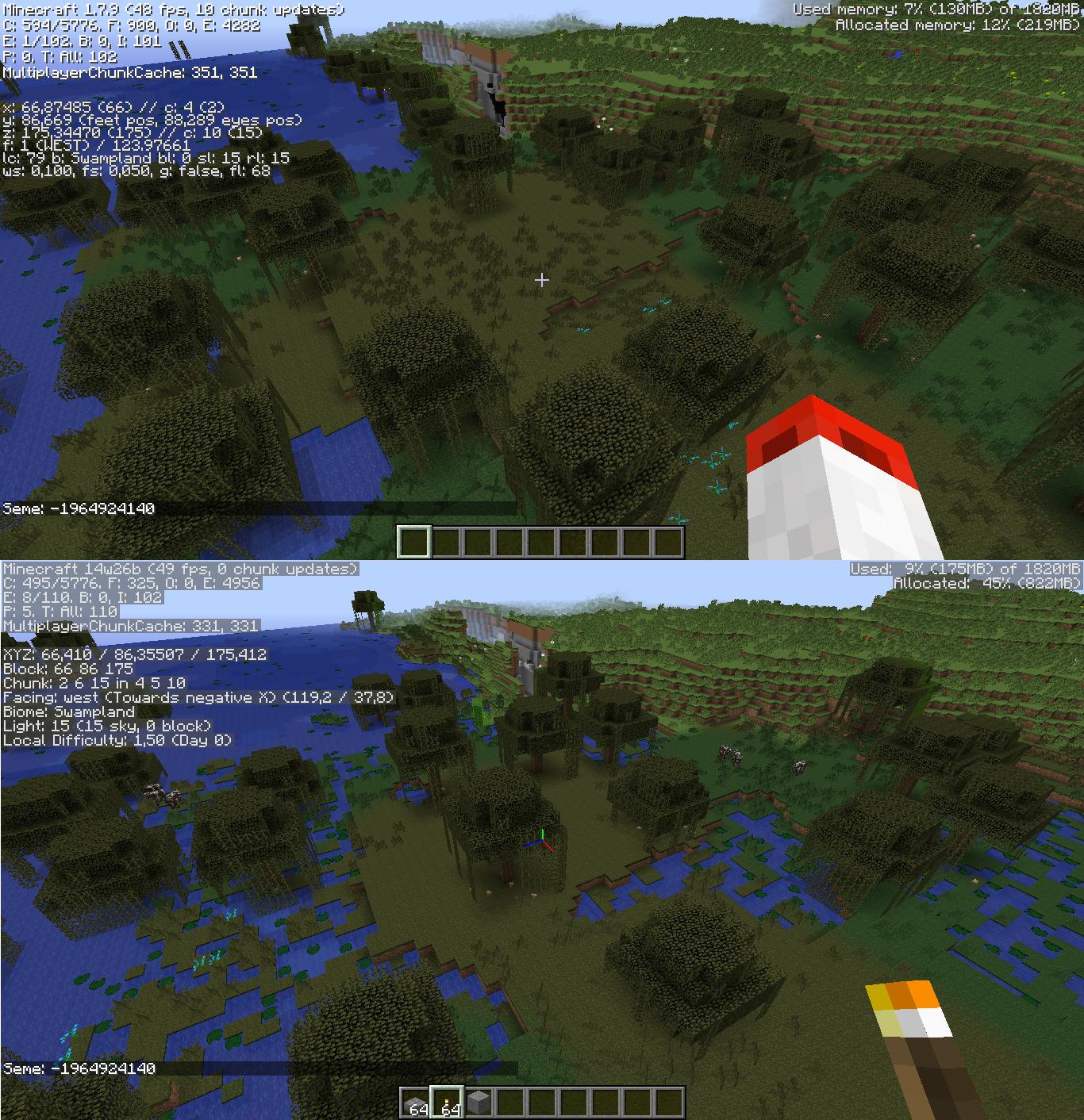
- Minecraft:Red sandstone generates at cavern entrances in mesa biomes.
- Chests now have the possiblity of containing obsidian.
- No longer have a Minecraft:red mushroom inside the Minecraft:flower pot.<ref>Template:Bug</ref>
Minecraft:World boundary & border
- The new world border is generated at the world boundary.
- There is now literally nothing beyond the world boundary.
- The default world border is an animated texture, rather than an invisible Minecraft:bedrock barrier.
- It's set at a diameter of 60 million blocks, for both the Minecraft:Overworld and Minecraft:the Nether.
- The Template:Cmd command allows the player to customize various aspects of the world border:
- Its size, center, damage, animation time and warning time and distance.
- When the border changes size, it does it by a shrinking or expanding animation of constant speed.
- While the border may appear to occupy a fraction of a block, it is defined only on integer steps.
- Players can't pass through the world border from the inside while it's stationary.
- Players pass through the border if it shrinks past them.
- Players on the outside of the world border that are not in Minecraft:Creative or Minecraft:Spectator mode, take damage.
- It is always possible for players to enter the world border from the outside.
- Aside from the above, it is possible to freely fly/walk around.
- Minecraft:Mobs and Minecraft:item entities are unaffected while outside.
- When the player gets within a certain distance of the border, a red-aura-like warning activates.
- Visible only on Fancy graphics.
- Outside the border the warning is always at full strength.
- Inside the border the warning gradually gets stronger as the player approaches the border or viceversa.
- If the border is stationary, the warning is first seen as the player passes the specified warning distance.
- The default is 5 blocks from the player's location.
- If the border is shrinking quickly enough, the warning is first visible at the specified warning time.
- The default is 15 seconds from the player's location.
- If the border is stationary, the warning is first seen as the player passes the specified warning distance.
- The border extends infinitely in the vertical axis; below bedrock and beyond the build limit.
- It does not render beyond certain heights, like below bedrock.
- The width and length of the border are always the same with respect to each other (like a square).
- It cannot be removed from any world, since it can only be reduced to a 1×1 square.
Gameplay
- Now costs from 1 to 3 pieces of Minecraft:lapis lazuli as well as Minecraft:XP.
- The XP cost is 1–3 levels – the same number as the lapis lazuli the player spend.
- The player still needs the same minimum total levels to unlock it.
- The actual enchantment calculations are the same.
- One and only one of the possible enchantments are displayed in the tooltip.
- The enchantments the player would get on a specific kind of Minecraft:tool do not change until the enchantment happens.
- This enchantment seed is stored per player.
- Leveling up takes longer.
- Level V enchantments can now appear on an item, without the use of an Minecraft:anvil.
- Looting now gives an extra 1% chance of getting rare loot per level.
Minecraft:Anvil repairing
- Costs reduced to balance out with the new enchanting system.
- Renaming items costs only 1 level.
- Repairing cost now increases exponentially (1, 2, 4, 8...).
- Repairing costs can no longer be kept down by renaming items.
Villager Minecraft:trading
- Villagers of specific professions (colored clothes) have distinct careers (see above).
- Existing villagers keep already unlocked trades.
- Villagers start out with 2–4 trades unlocked.
- Trading gives Minecraft:experience to the player.
- The disabled trade arrow has a descriptive tooltip.
- Villagers of the same career have the same trades, but they differ in price/item amount.
- Villagers can level up, offering more trades per level.
- Notable changes in trades:
- Villagers no longer buy cooked fish and no longer sell melons, steak or flint and steel.
- The only pieces of armor that are still sold are chainmail armor, iron helmets and chestplates, enchanted diamond chestplates, leather pants and enchanted leather chestplates.
- The only tools still obtainable from villagers are iron axes, iron shovels, iron pickaxes, enchanted iron swords, diamond pickaxes, diamond swords and diamond axes.
- Notable new trades:
- Buy potatoes, carrots, melon blocks, pumpkins, string, leather and rotten flesh.
- Sell pumpkin pies, cakes, cooked fish, enchanted fishing rods, all colors of wool, bows, name tags and lapis lazuli.
- Doors are added to the closest village, rather than the oldest available one.
- This does not break iron farms, but change them enough to make them "practically pointless".<ref>Template:Tweet</ref>
Minecraft:Health bar
- Has a new animation for Minecraft:damage, that shows how many hearts the player just lost.
Minecraft:Adventure mode
- Block mining and placement is impossible by default.
- Block hitboxes no longer appear in Adventure mode if interaction with the block is impossible.
- The
CanDestroyNBT tag can be used to determine which blocks can be allowed to be broken with what tool (see above for usage). - The
CanPlaceNBT tag determines which blocks can be placed on top what blocks (see above for usage).
Minecraft:Creative mode
- Players can create a copy of a block-entity in their hotbar, including all NBT data pressing Template:Key+Template:Control.
- Players can damage entities, even if they are flagged as
invulnerable.
- Sprinting while flying now affects movement speed.
Step Height
- Step height increased from 0.5 to 0.6.
- Changed the effect color of Minecraft:Jump Boost from Template:Color to Template:Color.
Teleporting
- Is now smoother and seamless.
- Conserves the player's velocity and rotation by default.
- It's much more accurate than a single block.
Item tooltips
- Show the internal name for use in commands (Template:Key+Template:Key mode).
- Can be summoned using the Template:Cmd command.
- Changed the particle effect when landing on a block.
- Before, the particles were arranged in a circumference.
- It looks a lot more scattered, but it's still radial.
Player list
- Improved the health objective display on the player list.
- Falls back to textual display if space is scarce, with colors (green/yellow/red) to show different health levels.
- Additional health squashes the display together to fit.
- Groups together teams.
- Sorts players alphabetically by name.
- Player list shows the faces of the Minecraft:skin of players.
- Text color darkened to Template:Color, the same color as before 1.2.4.
Command format
- Now support cubic areas.
- Example:
@e[x=0,y=0,z=0,dx=10,dy=10,dz=10]Targets all entities between 0,0,0 and 10,10,10.
- Example:
- New radius value usable in target selectors, based on the block center.
- A radius of 0 works for exact block positions.
- The command applies at exactly the center of the respective block, rather than at a corner as previously.
- A radius of 0 works for exact block positions.
- New selector parameters to detect entity rotations, with rxm = x-rotation minimum, rx = x-rotation maximum, rym = y-rotation minimum and ry = y-rotation maximum.
- Example:
@a[rxm=-15,rx=15,rym=-45,ry=45], /say @a[rx=30], don't look down!.
- Example:
- Template:Key completing coordinate arguments fill in the coordinates of the block that the player is looking at.
- Template:Cmd
- Can specify whether particle effects are to be shown:
- Usage: Template:Cmd.
- Use 'true' to hide particles and 'false' to show; defaults to false.
- Template:Cmd
- Now lists all entities using
@e. - Example: Template:Cmd Lists all the entities in the world within a 500 block radius.
- Now lists all entities using
- Template:Cmd
- Can now be used to clear only a specific number of items, and can be restricted to certain NBT data.
- Example: Template:Cmd Removes up to 34 villager spawn eggs named Michael from yourself.
- Can test for partial NBT matches.
- Template:Cmd
- Can test for partial matches of NBT lists.
- Template:Cmd
- Template:Cmd argument to check the time.
- Has an another argument after that which can be
daytimeorgametimeto check either the number of ticks since the start of the day or the number of ticks since the world was created, respectively.
- Has an another argument after that which can be
- Template:Cmd argument to check the time.
- Template:Cmd
- Now supports rotation arguments.
- Example: Template:Cmd Teleports the player so that they face 20 degrees to the right and 40 degrees downward.
- Template:Cmd
- Can be followed by a target selector.
- Example: Template:Cmd.
- Template:Cmd
- Template:Cmd command can now summon lightning using Template:Cmd.
- Template:Cmd
- Can also check for dataTags.
- Example: Template:Cmd.
- No longer is exclusively usable in command blocks.
- Can check for specific items in the inventory.
- Example: Template:Cmd.
- Template:Cmd
- A new tag called
insertionallows text to be inserted into the chat, that when shift-clicked, inserts more text into the players' chat input.- Example: Template:Cmd.
- Can insert values from scoreboards into messages.
- Example: Template:Cmd.
- Now has a
selectorargument.- Allows to print player's names.
- Example: Template:Cmd prints the name of everyone who is on TeamRed.
- Can display entity tooltips, when the
actionforhoverEventis set toshow_entity.- Example: Template:Cmd }}. Prints a message when hovered over the tooltip of a zombie named "dummy".
- A new tag called
- Template:Cmd
- Can now be run in single player.
- New arguments for debug Template:Cmd.
- x/y/z are required and valid only for chunk mode.
- Template:Cmd & Template:Cmd
- Can support named IDs as well as numerical IDs.
- Example: Template:Cmd.
- Example: Template:Cmd.
- Can support named IDs as well as numerical IDs.
NBT format
Age- Can be set to -32768 for items that never despawn.
CustomNameandCustomNameVisible- Now works on all entities except the player.
pages- Uses the JSON text component instead of plain text for books.
- Capable of using the
clickEventandhoverEventtags. - Previously, text formatting could be accomplished only using the section symbol via Minecraft:Formatting codes.
Text1,Text2,Text3andText4- Uses the JSON text component instead of plain text for signs.
- Can be used to show scores of players by using the
selectorandscoretags. - Previously, text formatting could be accomplished only using the section symbol via Minecraft:Formatting codes.
- Character limit is based on character width.
General
- "OpenGL 1.2!" changed to "OpenGL 2.1 (if supported)!"
- "Now java 6!" changed to "Now Java 6!"
- Custom Minecraft:block models can be loaded through resource packs.
- If multiple models are assigned to the same block, then it pick one at random.
- The default resource pack made changes to some block models.
- The cauldron's feet now have volume, instead of being just planes.
- Minecraft:Grass blocks, Minecraft:dirt, Minecraft:sand, Minecraft:red sand, Minecraft:stone, Minecraft:netherrack, Minecraft:bedrock and Minecraft:TNT all have their top texture randomly rotated
- Support for custom Minecraft:item models.
- Many items' models are rotated 90 degrees in the inventory and in hand.
- Template:Key+Template:Key and Template:Key+Template:Key reloads all models.
- Default resource packs can now be bundled with a world.
- It is done by putting it in the map save directory, and naming it "resources.zip".
- Example:
.minecraft/saves/TheMapWithTheThing/resources.zip.
Minecraft:Skin customization
- Added a new default skin: Alex.<ref>[1]Minecraft skins - Mojang</ref>
- Alex's model is that of Steve, but with 3-pixel wide arms instead of 4.
- A choice to select between the Alex and Steve player models on minecraft.net/profile was added shortly after the update.<ref>Template:Tweet</ref>
- If the player doesn't have a custom skin yet, they are randomly assigned a Steve or Alex skin/model based on the random user ID.
- Skins designed for a specific player model do not automatically translate well to another model.
- Right and left arms and legs are editable independently.
- Uses a modified steve.png file, with new layout and new dimensions.
- Dimensions for the file are now 64×64.
- Uses a modified steve.png file, with new layout and new dimensions.
- Overlays now include the whole body.
- The player can toggle the visibility of each overlay separately in the options menu.
- Overlays are called hat, jacket, sleeves and pants legs.
- Old skins still work, but don't have the new features, and may need some elements of it to be mirrored.
- Video settings
- Template:Key fullscreen toggle is now in sync with the fullscreen toggle of the options menu.
- Removed the "Advanced OpenGL" and "Anisotropic Filtering" toggles.
- Anisotropic filtering has been disabled by default, but it's still accessible through some special settings on AMD graphic cards.
- Changed the 3D anaglyph effect to look more accurate close up.
- Multiplayer settings
- Removed the toggle for the visibility of the cape.
- It was moved to the new skin customization settings.
- Render distance slider can go up to 32, when using 64-bit Java and at least 2 GB of allocated RAM.
- Removed the toggle for the visibility of the cape.
- Improved chat communication.
- Messages are now either chat, system or action bar messages.
- Action bar messages are always shown, chat and system messages are shown only if chat settings are configured that way.
- Entities now have tooltips in certain chat instances when hovered over.
- These appear when hovered over an entity's name in chat (e.g. the success message for Template:Cmd).
- Shows the name of the entity (e.g. Bob), the Id of the entity (e.g. Creeper (50)) and the entity UUID.
- Template:Key+Template:Mouse while hovering over the entity's name inserts its UUID into the chat bar. They also work in commands.
- Template:Key + Template:Key clears the chat history (including previously typed commands).
UUID
- All player lists are converted to the UUID-based system automatically.
- Other features such as pet ownership now follow the same system.
- This is part of the requirements for the Minecraft:Plugin API.
- Text now has a gray and translucent background.
- Now displays render distance, sections being rendered currently, sections being updated currently, an aB value for unknown reasons, version id, whether the client is modded, keywords for when Clouds/VBOs/VSync are enabled, the display resolution and vendor, the graphics card model and vendor and the local OpenGL and Java versions.
- Player coordinates displays which block the feet are in.
- Before it was at the head level.
- When looking at a block, its coordinates, block id and properties are displayed.
- Block states of the block being looked at are displayed on the F3 menu.
- The Facing: line now indicates in which axis-based direction the player is looking at on the horizontal plane.
- For example: "Toward positive Z".
- The crosshair turns into 3 short, colored lines indicating the positive direction of the 3 axis: "x-red", "y-green", "z-blue'".
- Light is now the light level at the feet.
- Before it was the at the head level.
- Player rotation is now displayed for the vertical angle, as well as the horizontal one.
- Day counter added.
- Increases by 1 every dawn.
- Is independent of any Minecraft:statistic.
- Now displays difficulty.
- Peaceful–0.00, Easy–0.75, Normal–1.50, Hard–2.25.
F3 hotkeys
- Debug tooltips now show how many NBT tags an item has.
- When debug tooltips are enabled, items show their name id.
- When debug tooltips are enabled, some instances of usernames and entities in the chat shows the entity's UUID when hovered on.
- Template:Key + Template:Key can now be used to clear the chat log.
- Template:Key + Template:Key or Template:Key + Template:Key reloads block models.
- Template:Key + Template:Key entity hitboxes now also display entity eye level in red, and which direction entities are looking at in blue.
- Template:Key + Template:Key tooltips now show how many NBT tags an item has.
Block IDs
- Instances of blocks/items referenced in commands can now be named IDs.
- Example:
id:"minecraft:stone". - In scoreboards, the format is
minecraft.block.stone. - Old numerical IDs are still supported, but will eventually be phased out.
- This is part of the requirements for the Minecraft:Plugin API.
- Example:
Block handling
- Now uses block states internally instead of metadata.
- Metadata will still be used for a while.
- Metadata no longer needs to be calculated out of the 4-bit data value.
- Instead the values of specified properties can now be easily gotten and set.
- Now can:
- Set the default resource pack handling: prompt, enabled or disabled.
- Customize network compression in
server.propertiesusingnetwork-compression-threshold:0to compress everything, or-1to compress nothing. - Optionally send a hash for clients to verify resource packs, using
resource-pack-hashinserver.properties: Should be a 40 character hexadecimal string; otherwise it is used as a unique id. - Configure how long a tick may take before shutting down using
max-tick-timeinserver.properties. - Configure the maximum world size (which overrides Template:Cmd) using
max-world-sizeinserver.properties. - Send messages to be displayed on the action bar.
Rendering & performance
- Each Minecraft:dimension (Minecraft:Overworld, Minecraft:Nether, Minecraft:End) runs on separate threads.
- This makes it so that the performance in one dimension, is independent of the performance in all others.
- Minecraft:Chunk rendering and chunk rebuilds are now multi-threaded to speed them up.
- Minecraft:Mob pathfinding is now multi-threaded, to alleviate previous slow-downs associated with it.
- Ore generation is now more than twice as fast.Template:Citation needed
- Only transparent blocks can render as transparent.
- This makes all x-ray texture packs useless.
- Rewrote chunk sorting and block rendering.
- Better visibility culling.
- Inherited from the Minecraft:Pocket Edition.
- Now it renders only those blocks in view of the player instead of the entire render distance radius.
- Statistics for items/blocks are now be referenced per name, instead of ID.
- The animation in Minecraft:first-person view, where an item moves up and down is no tied to held item being changed instead of selected hotbar slot change.
- This causes the animation to longer play when switching between 2 identical items by changing the selected Minecraft:hotbar slot
- This causes the animation to play when the data of the held item is changed in any way, such as dropping it, which changes the count or enchanting it with the /enchant command
Fixes
Trivia
- At the time, this was the longest development to a major update in the history of Minecraft, with the first snapshot coming out on January 9, 2014, 236 days before the full release.
- The previous longest was 1.3.1, with 111 days from the first snapshot to the final release – less than half of 1.8's.
- At the time, this update had the most development snapshots of any major update so far, at 52 snapshots.
- The update with the most snapshots previous to this was also 1.3.1, with 19 snapshots, slightly more than one-third of 1.8's snapshot count.
- 1.9 broke the record with slightly more snapshots, with 56.
- Upon the release of 1.8, a change with how skins worked has caused skins that were changed after the release of 1.8 to not display on the Minecraft:player in versions 1.2.5 and prior.
- With 426 fixes, 1.8 has the second most bug fixes of any update, beaten only by 1.16.
- 1.8 was the last non-development version of Java Edition released before Mojang Studios' acquisition by Microsoft.
- 1.8's cycle held the record for the most further revisions out of any Minecraft:Java Edition full release update cycle, with 9 revisions, and therefore 10 total updates. This was only beaten 11 years later by the 1.21 update cycle upon the release of 1.21.10.
Notes
References
Template:Navbox Java Edition versions
Minecraft:de:1.8 Minecraft:es:Java Edition 1.8 Minecraft:fr:Édition Java 1.8 Minecraft:it:Java Edition 1.8 Minecraft:ja:Java Edition 1.8 Minecraft:nl:1.8 Minecraft:pl:1.8 Minecraft:pt:Edição Java 1.8 Minecraft:ru:1.8 (Java Edition) Minecraft:uk:1.8 (Java Edition) Minecraft:zh:Java版1.8